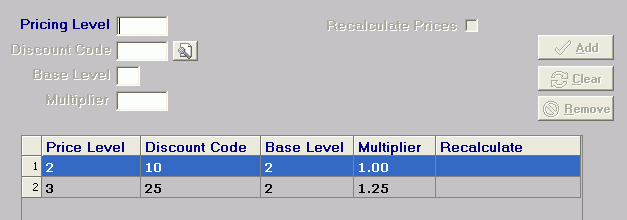
This is an example of how Level Pricing works. Assume we have a product called PRD01, and the default price level at Pricing Level field in the Location Settings (Warehouse Location) is three. In the Pricing Level Table (Fig. 2 below), assume the first two levels are your wholesale and retail prices, respectively, and now you want to use the Pricing Level Control Table to calculate price level three.
Fig. 1 - Pricing Level Control Table
When calculating or re-calculating level prices for a product, the system takes the following steps:
Load the price levels (if any) in the Pricing Level Table. If no price levels exist, the system does not apply level pricing for this product.
Load the formulas (if any) in the Pricing Level Control Table.
If both tables reference the same price level (in our case, price level two), the Pricing Level Control Table overrides the Pricing Level Table.
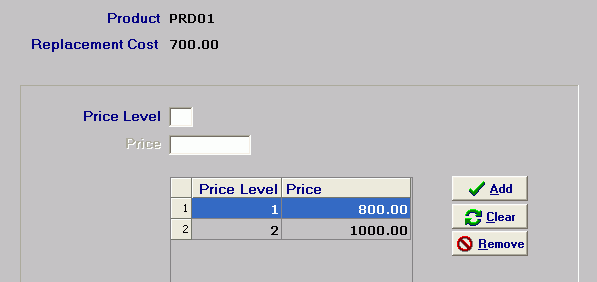
Fig. 2 - Pricing Level Table
Therefore, for PRD01, the system calculates the following price levels:
Price Level 1 (800.00) - Because no formula existed for in the Pricing Level Control Table, the system uses the 800 from Pricing Level Table.
Price Level 2 (1000.00) - The system references the Pricing Level Control Table and sees a formula for price level two (thus overriding price level two in the Pricing Level Table). The formula for price level two has a base level of two and a multiplier of 1.00. A base level of two means the system references the Pricing Level Table, uses price level two (1000.00) and multiplies it by the number in the Multiplier field (1.00) to get a result of 1000.00.
Price Level 3 (1250.00) - The system references the Pricing Level Control Table and sees a formula for price level three. The formula for price level three has a base level of two and a multiplier of 1.25. A base level of two means the system references the Level Pricing Entry table, uses price level two (1000.00) and multiplies it by the number in the Multiplier field (1.25) to get a result of 1250.00.
 The value in the Discount Code column does not affect these calculations. It represents a discount percent the system applies to the product at sales order entry time.
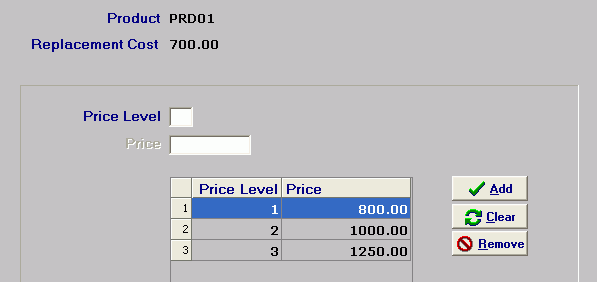
Fig. 3 - Pricing Level Table with a new (calculated) price level.